LMS Rollout Evaluation
A company had moved its training into a new learning management system. Before the full rollout, leaders needed to know whether it was actually working for employees. I designed and ran an independent formative evaluation and turned the findings into 6 prioritized recommendations.
- Client
- A telecom distribution company (name withheld)
- My role
- Independent evaluator: plan, instruments, data collection, analysis, report
- Methods
- Survey, focus group, usability testing, system observation
- Platform & timeline
- TalentLMS · Spring 2025 (2-week data collection)
The question
The company expected the LMS to centralize scattered training materials, make self-paced learning easy, and reduce the need for in-person sessions across onboarding, sales, and technical teams. Midway through implementation, the training manager needed evidence: Is it working for employees, and what should we fix before the full launch?
Approach
I followed a purpose → decisions → questions model, so every data point was tied to a decision the stakeholders actually had to make.
- Stakeholder alignmentI met with the training manager to define the purpose, the decisions the evaluation would inform, and the client's success criteria. Secondary stakeholders were HR, leadership, and IT.
- Five evaluation questionsThese covered ease of use, technical reliability across devices, engagement and relevance, access to support, and content organization.
- InstrumentsI wrote the survey questionnaire, a focus-group guide, and a usability-testing observation protocol with realistic task scenarios.
- Data collectionParticipants were 22 volunteers (8 new hires, 9 sales reps, 5 technical staff), all with informed consent, over a two-week window.
- AnalysisI used descriptive statistics for the survey, thematic coding for open responses and the focus-group transcript, and task-success and difficulty ratings for the usability tests. Then I triangulated across all three sources.
Key findings
Employee survey ratings (average, 1–5 scale, n = 22)
Content was rated relevant, but engagement trailed every other measure.
- Usable on desktop: 18 of 22 employees could find materials quickly, and 81% said content was easy to locate.
- Weak on mobile: mobile layout and font-size problems were the #1 theme (6 mentions), and 4 of 5 usability testers ran into mobile layout issues.
- Relevant but not engaging: employees called modules "dry" and "text-heavy" and asked for short videos and job aids. In one employee's words: "Useful? Yes. Engaging? Not really."
- Hard-to-find help and job aids: 2 of 5 testers rated finding a job aid "difficult," and several employees didn't know where to go for support.
- Technical glitches: 41% (9 of 22) reported an issue such as failed downloads, quiz delays, or mobile layout glitches.
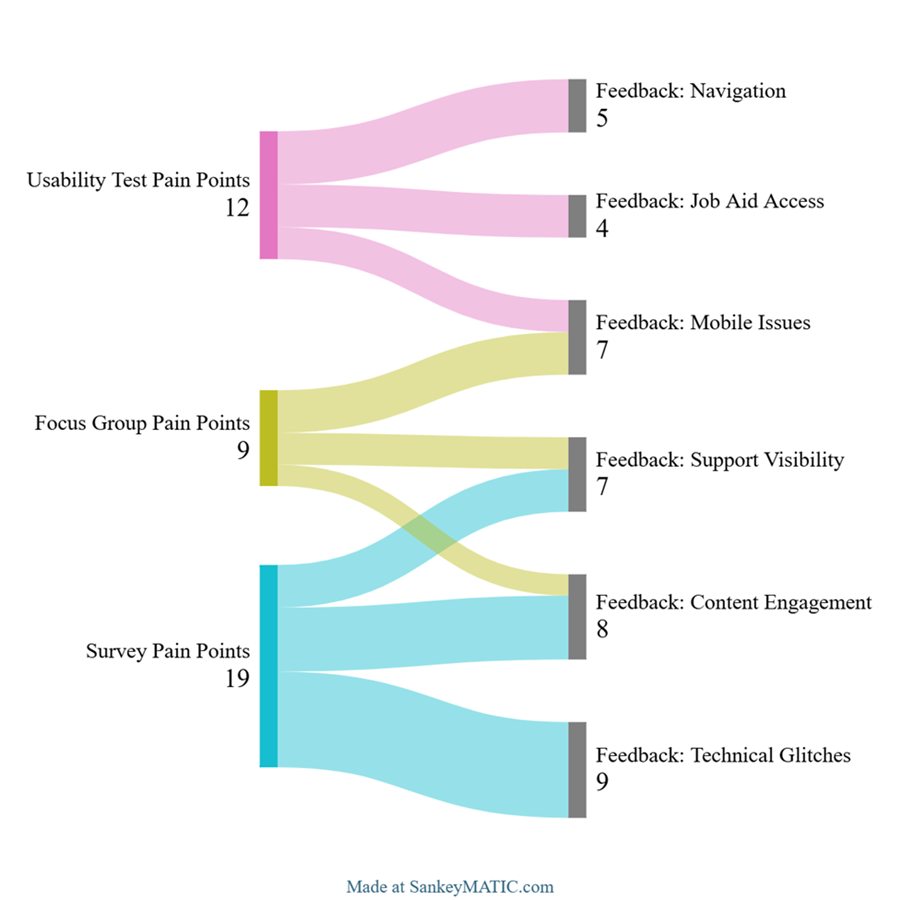
Recommendations
| # | Recommendation | Evidence |
|---|---|---|
| 1 | Prioritize mobile optimization and retest with end users | 4 of 5 testers; 6 focus-group mentions |
| 2 | Revamp content for engagement: short videos, microlearning, interactive cases, gamified checks, and smaller trackable units | Engagement 3.3/5, the lowest score |
| 3 | Improve job-aid access: filters, tagging, search-friendly names, and tooltips | 2 of 5 testers rated it "difficult" |
| 4 | Make support visible: a fixed help button, an FAQ, and an LMS orientation module | 4 survey + 3 focus-group reports |
| 5 | Fix technical glitches and add an in-platform issue form | 9 survey reports |
| 6 | Run a summative evaluation 6 months after launch: completion rates, performance, and logins against a baseline | Closes the loop on ROI |
What I learned
- Tie every question to a decision. Stakeholders act on findings when they can see which decision each one informs.
- Triangulate. Survey averages looked fine on their own. The usability sessions and focus group revealed why engagement and mobile scores lagged.
- Next time: I'd pilot the survey first and add one-on-one interviews for richer qualitative data.
Why it matters for your team: I don't stop at launch. I can show whether training is working and what to change next, with data leadership can act on.